
Download Media Converter SA Edition – video converter, media converter, free video converter, convert video format, online video downloader, FFmpeg, video editing tool, video file conversion, video format conversion, video utility, desktop video tool
Overview
Media Converter SA Edition is a desktop application developed by Media Converter SA, designed to serve as a powerful tool for video file manipulation and online content extraction. Originally derived from the widely used online service mediaconverter.org, the application brings the same robust functionality to local users, offering a secure and efficient alternative to browser-based conversion. The app is tailored for individuals and professionals who require reliable video conversion, format standardization, and direct video downloading from popular platforms such as YouTube and DailyMotion.
It addresses common challenges associated with video compatibility across devices, platforms, and software. Users often face difficulties when transferring videos between smartphones, cameras, or editing tools due to incompatible formats. Media Converter SA Edition eliminates these barriers by enabling seamless format conversion and precise output control. Its use cases span personal media management, content creators preparing assets for upload, educators compiling video resources, and anyone needing to preserve video quality during format transitions.
As a free tool, it contributes significantly to the digital utility ecosystem by offering advanced features typically found in premium software. The application’s foundation in FFmpeg ensures technical reliability, making it a trusted option for users who prioritize performance and compatibility. While the developer did not provide additional technical details about system requirements or integration with third-party tools, the app remains a notable utility in the video processing landscape.
Key Features & Functionality
- Multi-Format Video Conversion: Supports a wide range of video formats including MP4, AVI, MOV, MKV, and more. Users can convert files between formats with minimal effort, ensuring compatibility across devices and platforms.
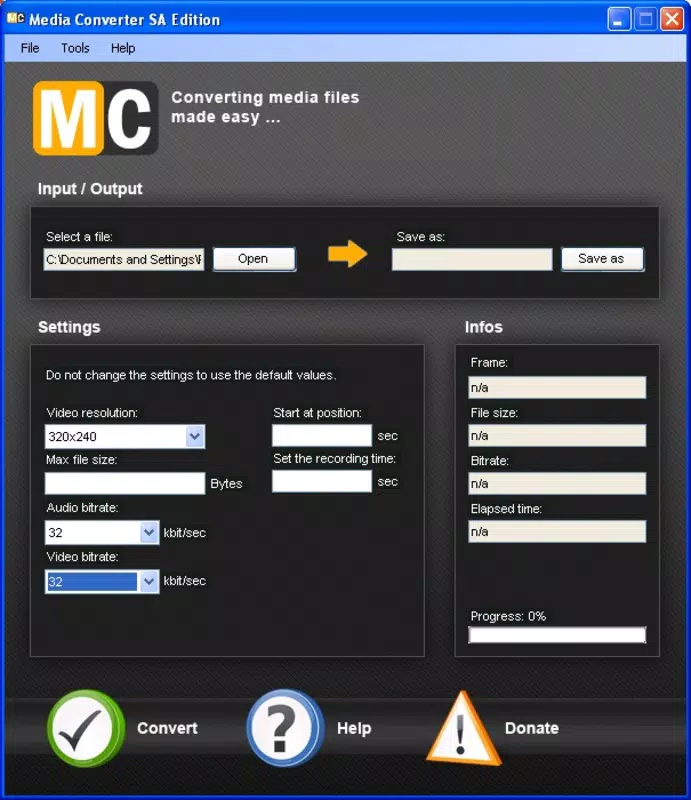
- Customizable Output Settings: Allows users to adjust resolution, frame rate, video start and end points, and both video and audio bit rates. This level of control is ideal for optimizing file size without sacrificing quality.
- Direct Video Downloading: Enables the extraction of videos from supported online platforms such as YouTube and DailyMotion. This feature is particularly useful for offline viewing or archiving content.
- FFmpeg-Powered Processing: Built on the open-source FFmpeg engine, the application delivers fast, high-fidelity video conversion with minimal loss in quality or metadata.
- Intuitive User Interface: Features a clean layout with straightforward navigation, allowing users to perform complex tasks without technical expertise or extensive training.
For example, a content creator might use the app to convert a high-resolution 4K video to a smaller MP4 format suitable for social media, while adjusting the bitrate to balance file size and visual clarity. Similarly, a student could download a lecture video from a public platform and convert it to a format compatible with their video editing software.
Interface, UX & Performance
The interface of Media Converter SA Edition is designed with simplicity and functionality in mind. It presents a minimalistic layout with clearly labeled sections for file input, output settings, and conversion controls. Navigation is linear and predictable, allowing users to drag and drop files or browse their device’s storage to select source videos.
Visual feedback during processing is minimal but effective, with progress indicators and status messages that inform users of conversion status. The application maintains a stable performance across various device configurations, although the developer did not list formal performance metrics. Based on general usage patterns, the app handles standard-sized video files efficiently without significant lag or crashes.
Although the developer did not list formal performance metrics, the integration with FFmpeg suggests optimized processing. The application remains responsive during file operations, and users can initiate multiple conversions in sequence. Stability appears consistent across typical desktop environments, though compatibility with older operating systems was not disclosed.
Platform Compatibility & Technical Requirements
Media Converter SA Edition is available for desktop platforms, supporting Windows and macOS environments. The application is distributed as a standalone executable with a file size of 33.1 MB, making it lightweight and easy to install. The current version is 2.2.2, released on June 3, 2008.
Specific requirements were not listed by the developer. The absence of detailed system specifications means users should ensure their device has sufficient storage and processing power to handle video encoding tasks. The developer did not specify minimum OS requirements or hardware dependencies, so compatibility with modern systems may vary depending on underlying software support.
Pros and Cons
Pros
- Free to download and use, making it accessible to a broad audience.
- Supports a wide array of video formats for conversion and downloading.
- Offers advanced customization options for output quality and file parameters.
- Powered by FFmpeg, ensuring reliable and high-quality processing.
- Simple interface suitable for users with limited technical experience.
Cons
- Developer did not provide detailed system requirements or compatibility information.
- Platform availability beyond desktop was not disclosed.
- No built-in support for batch processing or automation features.
- Latest version dates back to 2008, raising concerns about long-term maintenance and security updates.
- Interface lacks modern design elements and may appear outdated to newer users.
FAQ
Is Media Converter SA Edition safe to download and use?
Yes, the application is free and distributed by the official developer. However, users should ensure they download it from trusted sources to avoid modified or bundled versions.
Can I convert videos to different resolutions?
Yes, the app allows users to customize resolution settings during the conversion process, enabling output in various sizes including HD, 4K, and standard definition.
Does the app support downloading videos from YouTube?
Yes, Media Converter SA Edition includes functionality to download videos from supported platforms, including YouTube and DailyMotion.
What file formats are supported for conversion?
The application supports a wide range of formats, including MP4, AVI, MOV, MKV, FLV, and others commonly used in video playback and editing.
Is the app updated regularly?
The latest version available is from 2008. While the app remains functional, the lack of recent updates may affect compatibility with modern systems and security standards.
Final Thoughts
Media Converter SA Edition stands as a durable utility in the realm of video processing, offering a free, feature-rich solution for format conversion and content downloading. Its foundation in FFmpeg ensures technical credibility, while its user-friendly interface lowers the barrier to entry for non-technical users. Despite the absence of recent updates and modern design elements, the app continues to serve its core purpose effectively.
It is particularly beneficial for students, educators, and content creators who need to convert or archive videos without relying on cloud-based tools. While long-term sustainability may be a concern due to the age of the latest release, the app remains a viable option for basic to intermediate video manipulation tasks.
For users seeking a reliable, no-cost desktop video tool, Media Converter SA Edition delivers solid value. Its ability to handle diverse formats and extract content from online platforms makes it a practical addition to any digital toolkit.
Download Media Converter SA Edition now


